
“When an attack executes entirely within official Microsoft infrastructure, standard security controls do not simply fail. They actively report that everything is operating normally.”
Wazza represents an evolutionary leap in identity exploitation, operating as a turnkey phishing-as-a-service (PhaaS) kit engineered to turn native cloud protocols against the enterprise. By weaponizing the OAuth 2.0 Device Authorization Grant, Wazza maneuvers targets into completing authentic login ceremonies directly on legitimate endpoints.
Because victims fulfill multi-factor authentication (MFA) on Microsoft’s own domains, known defenses, secure email gateways and cloud risk engines evaluate the session as clean. Behind the scenes, Wazza’s automated polling engine captures a broad scope and refresh tokens, handing threat actors persistent, high-privilege Graph API access without ever touching a user’s password.
This technical overview deconstructs Wazza’s multistage attack architecture, analyzes its server-side cloaking mechanics and details the behavioral telemetry required for detection engineering.
This post focuses on the Wazza PhaaS kit and is part of our ongoing threat research series on PhaaS frameworks.
Operational context
The Wazza Phishing-as-a-Service (PhaaS) kit represents a critical evolution in identity-focused threat campaigns. Modern enterprise perimeter defenses have significantly raised the friction for traditional password harvesting and basic single-factor credential theft. In response, threat actors are systematically migrating from traditional credential harvesting toward OAuth session hijacking and device code abuse.
Rather than stealing static passwords or bypassing MFA through complex reverse-proxy infrastructure, kits like Wazza turn legitimate, standard identity operations into automated session-acquisition pipelines. By exploiting victim trust in first-party identity providers and leveraging native OAuth 2.0 grants, Wazza enables threat actors to capture fully authenticated, high-privilege access tokens without ever directly interacting with user passwords.
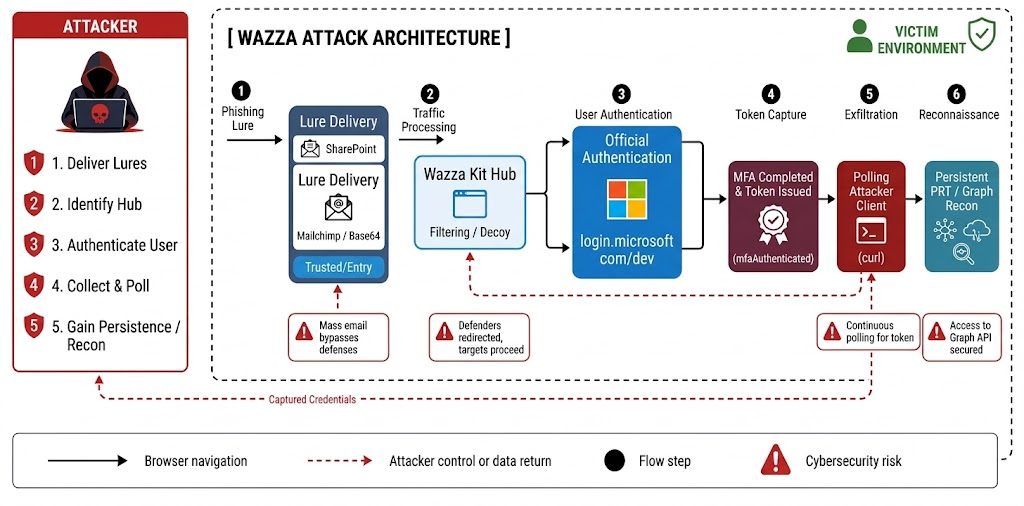
A Wazza PhaaS attack architecture diagram outlining a six-step process: lure delivery, traffic processing, user authentication, token capture, exfiltration and reconnaissance.
Key findings
- Threat actor attribution and scope: Intelligence disclosures from ANY.RUN attribute active PhaaS campaigns targeting financial services, manufacturing and public sector organizations across North America, Europe and Australia to the Wazza framework.
- Anti-analysis and traffic screening: The kit uses a multistage traffic distribution network with server-side token validation and session fingerprinting. This helps filter out automated security crawlers, dynamic sandboxes and threat research probes before delivering the payload.
- Primary exploitation vector: Transitioning away from legacy credential harvesting, Wazza leverages Adobe-themed social engineering lures to execute OAuth 2.0 Device Code Authorization abuse (RFC 8628). This tricks targets into granting direct session tokens rather than submitting static passwords.
- Adversary infrastructure topology: The operational ecosystem relies on a modular threat architecture comprising wildcard DNS landing domains, C2/API endpoints, serverless worker-based beaconing nodes and an isolated session validation gate.
Identity and campaign attribution
Security disclosures from threat intelligence researchers at ANY.RUN have exposed Wazza’s operational footprint. Wazza operates as a turnkey PhaaS platform that manages traffic filtering, session routing and victim screening server-side before serving landing environments.
- Targeted sectors: Banking, government and manufacturing
- Geographic footprint: United States, Europe and Australia
Within the broader cloud identity threat landscape, Wazza belongs to an escalating class of tools engineered to exploit the OAuth 2.0 Device Authorization Grant (RFC 8628). Analytical evaluation reveals both direct parallels and key operational distinctions across related threat actors and platforms:
- EvilTokens: An AI-enabled PhaaS platform surfaced by Microsoft in April 2026. EvilTokens automated device code phishing end to end, leveraging generative AI to build hyper-personalized lures and running 10 to 15 distinct campaigns every 24 hours to defeat the standard 15-minute device code expiration window.
- Kali365: A commodity PhaaS platform distributed via Telegram that features an integrated desktop client (
kali365-live/1.0.0) used by affiliates for automated session capturing, token polling and target-tracking dashboards. - Wazza PhaaS Kit: Combines automated device code protocol abuse with advanced server-side traffic screening and multistage redirect masking. It specializes in visual decoy alignment (specifically Adobe-themed portals) and server-side session control to insulate its backend from security crawlers while delivering real-time device authorization ceremonies.
Targeted profile and vector breakdown
- High-risk personas and roles: Broad corporate targeting across all personnel with elevated focus on finance and accounting (wire/payroll access), executive assistants (delegated permissions), operations and IT helpdesk/service desk (elevated access workflows)
- Industry vertical scope: Concentrated campaign activity across banking and financial services, government and public sector and manufacturing sectors
- Initial access vectors: Multichannel distribution leveraging commercial email infrastructure (ESP lures) and secondary web-based redirect chains
- Visual decoy and brand spoofing: High-fidelity spoofing of Adobe authentication portals and document-verification workflows to establish visual trust before redirecting to device authorization
Threat summary
| THREAT METADATA FIELD | OPERATIONAL SUMMARY |
| Threat name | Wazza PhaaS Kit |
| Threat category | Phishing as a service (PhaaS)/OAuth Token Theft Framework |
| Target sectors | Banking, government, manufacturing |
| Target geographies | U.S., Europe, Australia |
| Primary protocol abused | OAuth 2.0 Device Authorization Grant (IETF RFC 8628) |
| Delivery mechanisms | Legitimate email delivery services (e.g., Mailchimp Mandrill), Base64 URL parameter masking, multistage redirect chains |
| Post-compromise objectives | OAuth Access/Refresh Token acquisition, M365/Graph API reconnaissance, rogue device registration (Primary Refresh Token generation), targeted email exfiltration, persistence via hidden inbox rules |
Wazza’s operational model highlights how modern adversary tradecraft bypasses traditional perimeter delivery defenses, making it essential to analyze its multistage attack pipeline.
Multistage attack pipeline
Delivery funnel dynamics
Understanding Wazza’s multistage delivery pipeline is crucial for identifying how it bypasses traditional security boundaries. Wazza relies on multistage traffic distribution to evade secure email gateways (SEGs), automated URL sandboxes and threat intelligence crawlers before presenting the target with an authentic device code prompt.
By decoupling the initial link delivery from the final authentication payload and masking traffic behind legitimate infrastructure, Wazza ensures that initial inspection checks return clean reputation scores.
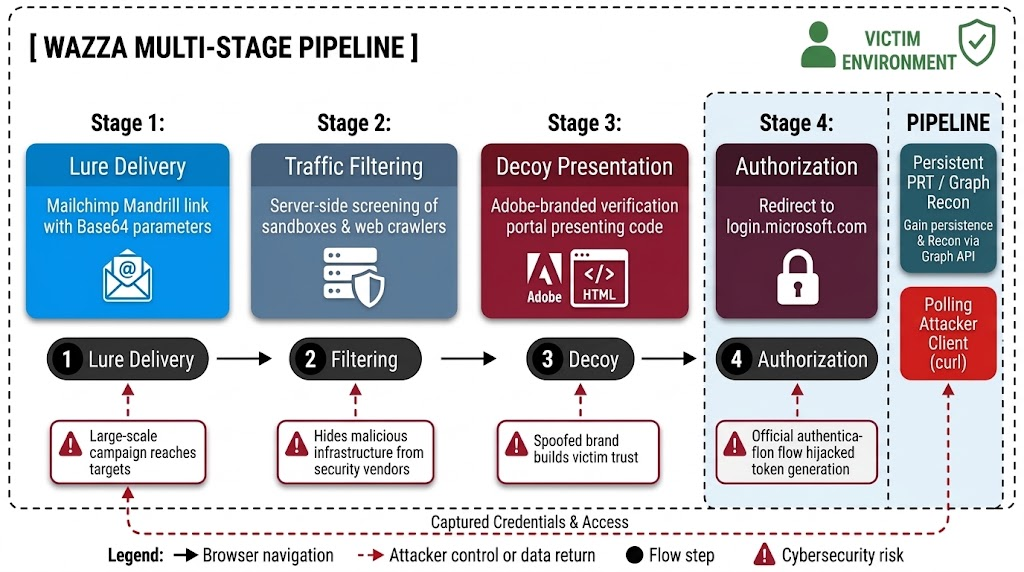
Wazza Multi-Stage Pipeline flowchart detailing a PhaaS threat overview: lure delivery, traffic filtering, decoy presentation and authorization, leading to persistent access and credential theft.
Stage-by-stage analytical breakdown
1. Lure delivery and redirect masking
- Attack vector: Initial access vectors abuse commercial email service providers (ESPs), specifically Mailchimp and Mandrill, to distribute malicious lures containing Base64-encoded URL parameters within nested redirect chains.
- Defensive evasion: Leveraging trusted ESP infrastructure guarantees valid SPF, DKIM and DMARC alignment. This effectively neutralizes domain reputation scoring and SEG link-rewriting controls. At the same time, Base64 parameter obfuscation bypasses static signature and regex inspection at the perimeter, ensuring uninterrupted inbox delivery.
2. Server-side traffic filtering and screening
- Attack vector: After link execution, inbound HTTP requests pass through Wazza’s backend infrastructure. This validates session state, inspects IP ranges and profiles HTTP headers.
- Defensive evasion: Automated security crawlers, cloud sandboxes and threat intelligence scanners connecting without valid session parameters or originating from security-vendor IP ranges are served benign decoy pages or HTTP redirects. This cloaking conceals the downstream landing environment from automated detection systems, extending the operational lifespan of the backend infrastructure.
3. Decoy landing and code presentation
- Attack vector: Targets passing server-side screening land on a high-trust corporate decoy portal spoofing Adobe branding and document-verification workflows. The kit dynamically fetches a legitimate user code from Microsoft’s API and displays it alongside step-by-step verification instructions.
- Defensive evasion: Aligning visual lures with routine document-signing workflows exploits established user habits. Because the prompt directs the target to official Microsoft endpoints, the attack bypasses browser-level phishing warnings and dynamic web scanners.
4. Victim authorization ceremony
- Attack vector: The victim opens Microsoft’s official device sign-in endpoint, inputs the provided
user_codeand completes authentic identity validation, fulfilling any required MFA prompts. - Defensive evasion: Interacting exclusively with authentic Microsoft domains ensures endpoint controls, network inspection tools and browser extensions evaluate traffic as entirely benign. Completing native MFA satisfies identity checks, while Wazza’s automated background polling scripts capture broad-scoped OAuth access and refresh tokens without ever touching user passwords.
Pipeline architecture summary
| STAGE | TECHNICAL MECHANISM | ATTACKER OBJECTIVE | DEFENSE EVASION IMPACT |
| Lure delivery | Mailchimp Mandrill links with Base64-encoded URL targets | Evade perimeter email inspection | Neutralizes SEG link rewriting, domain reputation and email transport rules |
| Traffic filtering | Server-side request screening, IP/UA filtering, session state gating | Filter out automated security analysis | Prevents sandbox detonations, threat intel crawling and automated URL detonation |
| Decoy landing | Corporate decoy (e.g., Adobe verification portal) presenting user_code |
Induce human completion of the device ceremony | Exploits visual trust; presents authentic authorization steps disguised as document access |
| Authorization ceremony | Target completes sign-in at login.microsoft.com/devicelogin or /device |
Acquire valid OAuth tokens from Entra ID | Bypasses AiTM proxy detections, URL reputation scanners and network TLS inspection |
This delivery architecture directly enables exploitation of the underlying protocol: the OAuth 2.0 Device Authorization Grant (RFC 8628).
Device authorization abuse mechanics
Protocol exploitation overview
The OAuth 2.0 Device Authorization Grant (RFC 8628) was designed for input-constrained devices that lack a full web browser, such as smart TVs, IoT hardware or CLI interfaces. In these scenarios, the device requests an authorization code and the user approves the request on a secondary, browser-capable device.
Abusing standard RFC 8628 functionality creates a major blind spot for traditional enterprise defenses. Security operations teams trained to detect password spraying, credential harvesting or adversary-in-the-middle (AiTM) reverse proxies find that device code phishing bypasses these controls entirely. In this attack, we don’t steal passwords, use a proxy domain or intercept credentials. We exploit the protocol abstraction layer.
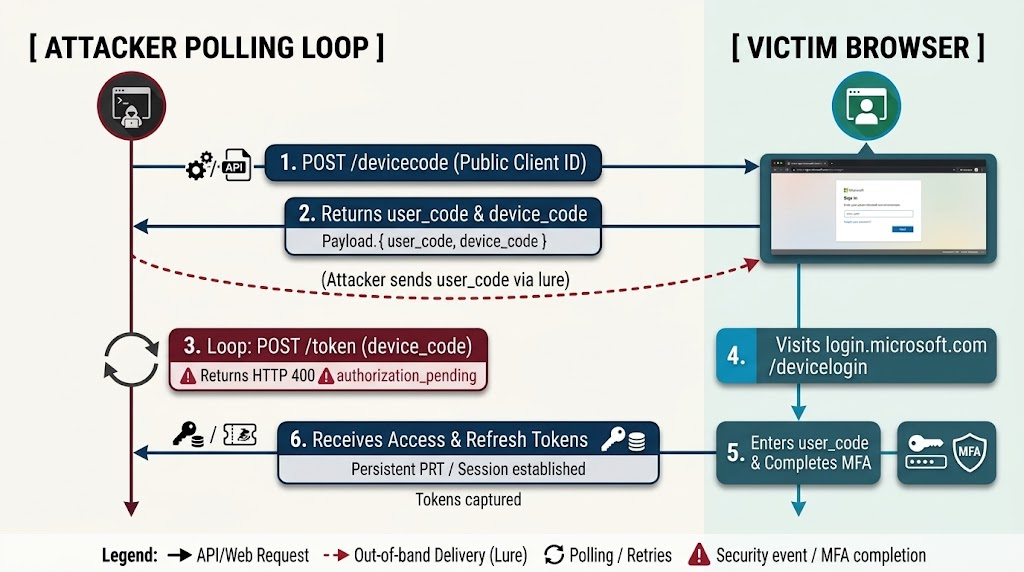
A Wazza threat overview diagram illustrating a device code phishing attack, showing the attacker polling the Microsoft login service to capture access tokens after the victim enters a code and completes MFA as part of a PhaaS campaign.
Analysis
1. Initial unauthenticated request
The Wazza framework initiates an unauthenticated HTTP POST request to Microsoft Entra ID’s device code endpoint: https://login.microsoftonline.com/<tenant-id>/oauth2/v2.0/devicecode
The payload contains key parameter fields:
client_id: Specifies a public application client identifierscope: Requests permission boundaries (e.g.,https://management.azure.com/.default,openid,profile,offline_access)
2. Abuse of first-party Microsoft public client IDs
Wazza leverages well-known, first-party Microsoft public client IDs, including:
- Azure CLI:
04b07795-8ddb-461a-bbee-02f9e1bf7b46 - Microsoft Office:
d3590ed6-52b3-4102-aeff-aad2292ab01c - Azure PowerShell:
1950a258-227b-4e31-a9cf-717495945fc2 - Device Registration Service:
01cb2876-7ebd-4aa4-9cc9-d28bd4d359a9
These first-party public client IDs are built into enterprise software ecosystems.
Since public clients cannot securely store client secrets, Entra ID allows them to request device codes without secret authentication. Enterprise administrators also cannot revoke these client IDs globally without breaking legitimate administrative shells, developer workflows and core office productivity applications.
3. Decoupling of identifiers and background polling loop mechanics
Entra ID responds to the initial request with a JSON object containing these critical identifiers:
user_code: A short alphanumeric string (e.g.,Q7M4-L9K2) intended for human inputdevice_code: A long, high-entropy secret session identifier reserved for backend token pollingverification_uri: The official authentication page (https://microsoft.com/deviceloginorhttps://login.microsoft.com/devicelogin)
The attacker delivers the user_code to the victim via the decoy page while keeping the device_code hidden on the backend.
While the victim views the decoy and navigates to the verification URI, the attacker’s client continuously executes a background polling loop by issuing HTTP POST requests to the token endpoint (/oauth2/v2.0/token) containing the device_code. During each iteration prior to victim completion, Entra ID returns an HTTP 400 error response with authorization_pending.
Once the victim completes authentication, the next polling request returns the full OAuth token payload.
Co-opting MFA
The victim navigates to login.microsoft.com/devicelogin (or microsoft.com/devicelogin), enters the user_code and authenticates against Entra ID. If the organization requires MFA (FIDO2, Microsoft Authenticator push or TOTP), the victim completes it directly on Microsoft’s domain.
MFA is satisfied rather than bypassed. The authentication claim generated by Entra ID confirms successful completion, producing issued tokens that bear valid MFA claims (mfaAuthenticated=true or AuthenticationRequirement=multiFactorAuthentication).
Comparative Threat Matrix
| DIMENSION | TRADITIONAL CREDENTIAL PHISHING | AiTM | WAZZA DEVICE CODE PHISHING |
| Victim landing page post | Attacker-controlled infrastructure/ lookalike domain |
Reverse proxy server (e.g., EvilProxy) | Official Microsoft domain (login.microsoft.com, microsoft.com) |
| Credential capture | Captures plaintext usernames and passwords | Intercepts credentials and session cookies via proxy | None. No passwords or credentials captured. |
| MFA Handling | Defeated by MFA requirement | Intercepts session cookies post-MFA | Co-opted. Victim completes MFA natively on Microsoft site |
| Attacker infrastructure visibility | High (phishing domain, public IP, web kit) | High (proxy domain, active web server, SSL certs) | Minimal. Attacker infrastructure only sends background API polling requests. |
| Token scope/longevity | Scoped to standard web session | Web session cookie bounded by browser lifespan | Broad application scope. Up to 90-day validity for refresh tokens |
| Impact of password reset | Revokes access immediately | Invalidates active web session | Ineffective. Stolen refresh tokens survive password resets. |
Post-issuance blast radius and persistence
Stolen OAuth token lifespan and session replay
Once issued, an OAuth refresh token remains valid for up to 90 days in default Entra ID configurations. Attackers use this refresh token to programmatically request new access tokens without triggering additional MFA prompts or user interaction. Because the tokens are unbound by default, an attacker can replay them from any network location or device, bypassing location-based Conditional Access policies evaluated only during the initial browser sign-in.
Protocol tracking across refresh cycles
Crucially, Entra ID tracks the original authentication protocol (deviceCode) across subsequent token refresh cycles. Consequently, downstream access using refresh tokens originally acquired via device code flow remains subject to protocol-based Conditional Access block policies. This provides vital context for SOC teams troubleshooting post-enforcement blocks.
Post-token persistence via rogue device registration
Within minutes of initial token acquisition (observed in under 10 minutes in automated campaigns), threat actors leverage the stolen session context to register new devices within Entra ID. This generates a primary refresh token (PRT) bound to the attacker’s hardware.
A rogue PRT provides persistent single sign-on (SSO) access across tenant resources. Because device-bound PRTs survive standard session revocation calls (revokeSignInSessions) and password resets, this creates a permanent foothold that requires explicit device object deletion to remediate.
Reconnaissance and impact
Attackers use the stolen context to query the Microsoft Graph API, mapping organizational roles, executive structures and financial permissions. Threat actors then filter for high-value targets, establish hidden inbox rules (to auto-delete security alerts and conceal BEC activity) and exfiltrate sensitive correspondence, financial invoices and payroll data.
This protocol exploitation relies on server-side screening and corporate decoy tactics to hide from security teams.
Advanced evasion, screening and cloaking capabilities
Traditional telemetry blind spots
Traditional security telemetry rates Wazza’s attack infrastructure as benign because the protocol mechanics eliminate traditional indicators of compromise. Security operations centers rely heavily on network proxies, SEGs, cloud access security brokers (CASBs), endpoint detection and response (EDR) agents and password reset playbooks to defend enterprise assets.
However, these tools rely on outdated, password-centric assumptions that leave the underlying identity fabric exposed to session-grant hijacking. Wazza neutralizes these controls by shifting operational logic server-side and routing victim interactions through legitimate infrastructure.
Evasion techniques
Server-side traffic control
Wazza manages session state server-side to screen incoming traffic. It detects automated analysis tools, security vendor web crawlers and IP addresses associated with cloud security providers during initial connection attempts.
Wazza serves these automated engines benign web pages or HTTP redirects, hiding the Adobe decoy portal and device code generation logic from threat intelligence scanners.
Legitimate URL abstraction
The authentication URLs involved in Wazza’s attack chain are authentic Microsoft endpoints (login.microsoft.com/devicelogin, microsoft.com/devicelogin or /device paths). This architectural reliance on Microsoft’s native domain neutralizes key perimeter controls:
- Domain reputation scoring: Automated URL reputation lookup services register
microsoft.comas an absolute high-trust domain. - CASB and proxy inspection: Proxy link-rewriting engines and inline CASB solutions evaluate the destination domain as an approved corporate service, bypassing blocklists and dynamic page analysis.
- TLS/SSL inspection: Enterprise deep-packet inspection engines routinely bypass decrypting traffic destined for core Microsoft identity services to avoid breaking authentication headers.
Brand decoys and social engineering
Wazza uses high-fidelity, Adobe-themed corporate decoys designed to fit standard organizational document workflows. By framing the prompt as a required step to view an encrypted PDF or sign a corporate document, the lure reduces target suspicion and drives victims to complete the authorization ceremony manually.
Detection evasion assessment
| TRADITIONAL SECURITY CONTROL | HOW WAZZA NEUTRALIZES IT | REQUIRED IDENTITY-CENTRIC COUNTERMEASURE |
| SEG | Uses Mailchimp Mandrill links with Base64 parameters | Inspect email lure structures for Base64 parameters routing to external redirect chains |
| Web proxy/URL scanner | Directs target to authentic login.microsoft.com endpoints |
Monitor Entra ID sign-in logs for AuthenticationProtocol == "deviceCode" |
| Identity protection (risk engine) |
MFA completes successfully; sign-in logs show Risk Level = None |
Correlate 50199 CmsiInterrupt events with immediate 0 Success codes for device flows |
| Password reset playbook | OAuth refresh tokens survive standard password resets | Execute explicit Graph API session and token revocations (revokeSignInSessions) |
| EDR | Authentication occurs via native browser to cloud identity provider | Correlate browser user-agents with non-interactive polling user-agents (e.g., curl) |
These cloaking capabilities require monitoring concrete technical indicators and behavioral artifacts across identity telemetry.
Behavioral signals
Shifting to behavioral telemetry
Defenders cannot rely on static domain indicators or IP blocklists to catch Wazza, as the attack leverages official Microsoft infrastructure for its user-facing components (login.microsoft.com/devicelogin, microsoft.com/devicelogin and /device paths).
Detection engineering must shift toward inspecting behavioral telemetry, authentication protocol fields, user-agent anomalies and protocol result codes within Entra ID and cloud SIEM environments.
Telemetry and artifact breakdown
User-agent artifacts
Device code attacks exhibit a key structural anomaly: a user-agent divergence between the interactive authentication browser session and the non-interactive background polling loop.
| USER-AGENT STRING | TELEMETRY CONTEXT | OPERATIONAL SIGNIFICANCE |
kali365* or kali365-live/1.0.0 |
Entra ID sign-in logs/M365 unified audit log | Default client user-agent for the Kali365 PhaaS desktop client during token polling and replay. Zero legitimate enterprise presence. |
curl/8* |
AADNonInteractiveUserSignInLogs |
Command-line HTTP client user-agent generated by automated attacker polling scripts retrieving tokens |
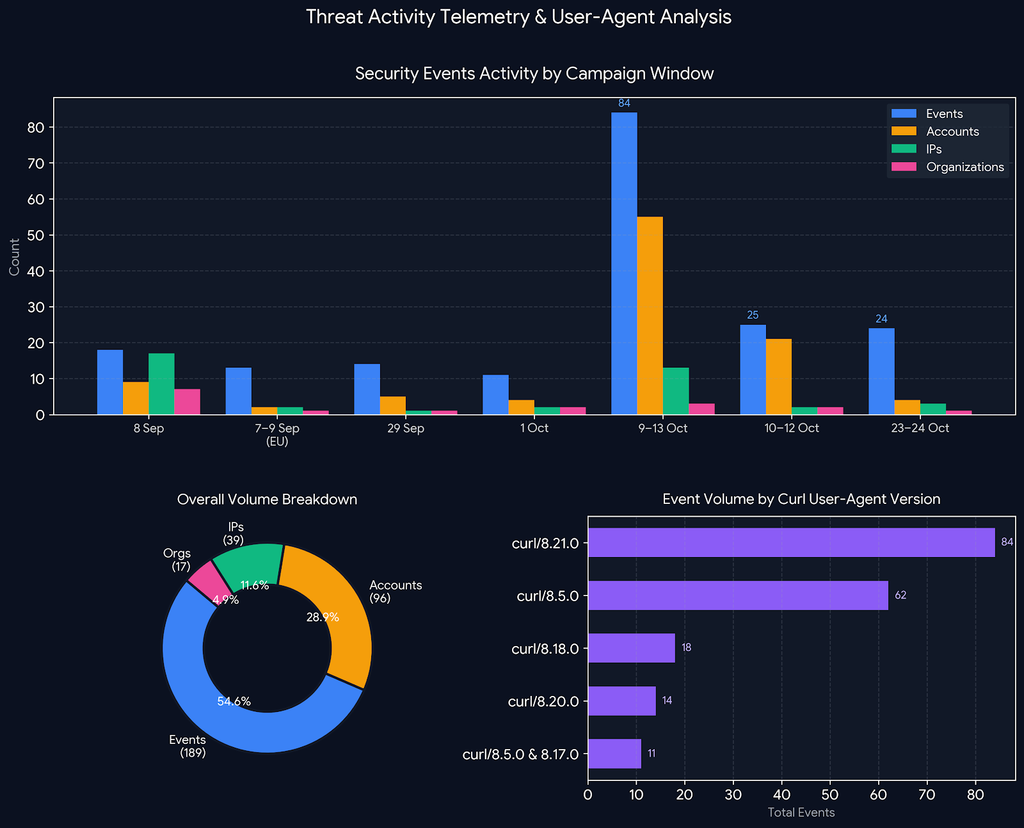
A Wazza dashboard showing threat activity, including a bar chart of security events by date, a donut chart of PhaaS Kit volume by category and a horizontal bar chart of event volume by curl user-agent version.
This diagram illustrates total attempts mapped against combined Entra ID event types below, targeted accounts and unique source IP addresses across distinct campaign windows. Of 189 total security events recorded across 96 accounts, the vast majority of non-interactive polling loops generated repeated invalid credential errors (ResultType 50126) and account lockout triggers (ResultType 50053), heavily concentrated around curl/8.21.0 and curl/8.5.0 execution windows.
The prominent presence of curl/8.21.0 across telemetry indicates a distinct attacker configuration and backend dependency, not random client traffic. In modern PhaaS ecosystems, attackers often hardcode this build into backend session-relay modules tied to AiTM and browser-in-the-middle (BitM) attack architectures to manage non-interactive token polling and session persistence.
High-velocity session and app ID spraying
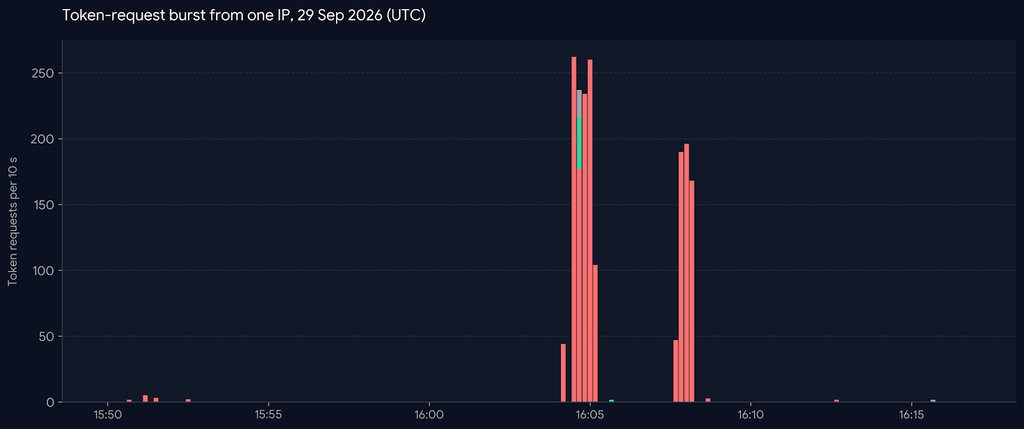
In an observed incident, adversary infrastructure executed a high-density token acquisition burst spanning just four minutes. Originating from a single IP address and targeting a few victim accounts, the automated engine issued about 1,700 token requests, each instantiating an independent authentication session.
To maximize post-compromise permission scope and evade single-application throttle limits, the polling script systematically distributed requests across roughly 30 distinct Microsoft Application IDs, explicitly targeting primary enterprise resource services including the Microsoft Office application.
Protocol response and Entra ID result codes
Entra ID sign-in telemetry captures specific ResultType codes during device code authorization workflows. Monitoring these codes allows defenders to track both successful compromises and failed attack probes.
ENTRA ID Error Codes |
DESCRIPTION/EVENT TYPE | BEHAVIORAL SIGNIFICANCE AND ALERTING TRIGGER |
0 |
Successful Authentication | Confirms successful token issuance. When paired with AuthenticationProtocol == "deviceCode", it serves as a primary alert trigger. |
50199 |
CmsiInterrupt (User-confirmation Interrupt) |
Represents the user confirmation step during authentication. A 50199 followed immediately by 0 in a short window is a high-fidelity attack sequence indicator |
50097 |
Device Authentication Required | Indicates device authentication was required during the ceremony; represents standard protocol friction |
70043 / 70044 |
Device Code Expired/Polling Timeout | Indicates the 15-minute authorization window expired. Signals either victim refusal or security scanner probes inspecting the lure. |
Network and infrastructure signals

Elli Schlomo
While user-facing interactions occur on Microsoft domains, the attacker’s backend polling scripts and management infrastructure originate from specific virtual private server (VPS) networks, hosting providers and known PhaaS nodes.
Elli Shlomo is head of security research at Guardz. Book a demo with Guardz. For more information on this topic and expanded infrastructure indicators, refer to the Security Research Labs. For expanded campaign analysis and context on concurrent threat activity, refer to ANY.RUN’s disclosure on Major Cyber Attacks in September 2026.